This is the release that answers the question nobody wants to ask out loud on a demo call: “So, how long does it take to stand one of these up?”
The Setup Assistant
The Setup Assistant ships a first-run wizard that walks an empty deployment from choosing an org type to a working queue, email, and SLA in a handful of skippable steps — plus a customer onboarding path that provisions a whole company in one shot. Teams can sign in the way their security office demands, via SAML2. And the admin Users screen finally stops being a wall of checkboxes.
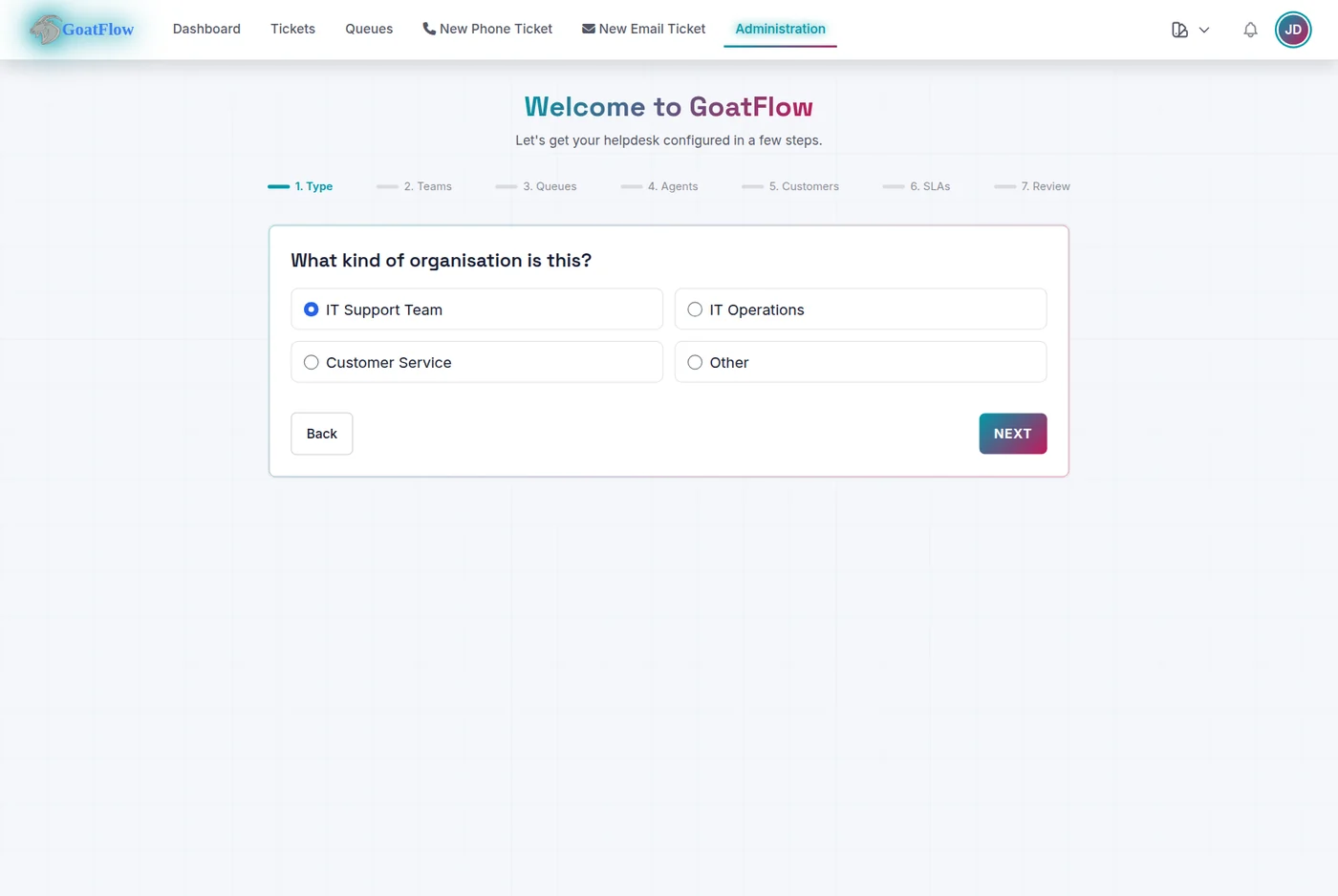
Heads up — the Setup Assistant is a technology preview. This is the newest part of GoatFlow, and we’re still hardening it — the wizard steps have only been partially exercised so far, and we’d rather tell you that up front than have you assume they’re fully battle-hardened. One thing worth stressing: the assistant is a convenience layer, not the platform. Everything it configures — queues, teams, SLAs, customers, email — is the same GoatFlow you can manage by hand in the normal admin UI at any time. So nothing about running GoatFlow depends on this wizard being perfect, and it’s not locking you into anything: if a step ever does less than you’d like, you can finish or correct it directly. The wizard itself will harden over the next release or two.
The first-run wizard is the headline, and to be plain it is work in progress. Fresh installs auto-redirect an admin through it, and the flow is:
- Organization type
- Teams
- Queues
- Agents
- Customers
- SLAs
- Review and create
Every step can be skipped, so it’s easy to stand up a working instance fast and come back for the optional pieces later. Re-running the assistant picks you back up where you left off, or lets you redo a step. The flow looks like this:
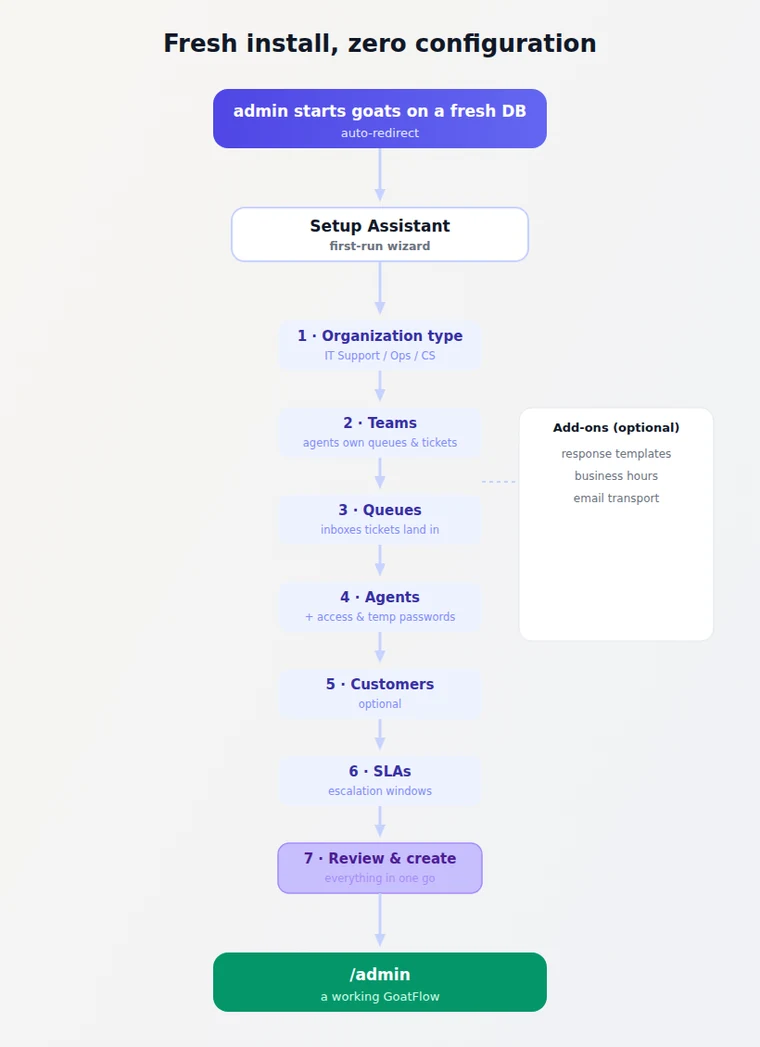
Business hours feed directly into the escalation service’s calendar, so SLA time calculations start from a real working-hours model instead of the midnight-to-midnight default. Email transport writes outbound SMTP settings into sysconfig, and canned responses give agents a head start on the first ticket.
The assistant is also a re-runnable task catalog, not a one-shot installer. The admin page shows entity snapshots and mini-wizards for common operations, and each task is a first-class registration in GetCoreTasks(), so plugins can contribute their own setup steps via GKRegistration.SetupTasks. The whole thing is reachable by JSON API at /api/v1/admin/setup/*, which means an LLM or a provisioning script can drive configuration too.
Customer Onboarding in One Shot
The Setup Assistant also has an “Onboard a customer” task that provisions an entire company in one flow — company record, managing agent teams, portal users with generated temporary passwords, Service/SLA mapping, and an inbound mailbox wired to a queue. It shares the same preview caution as the wizard: this is the least battle-tested corner of the release, and that is worth knowing before you run it in front of a customer.

There is also an existing-customer review mode: pick an existing customer from a type-ahead and the wizard loads their full configuration for editing rather than creating a duplicate. It is the same flow, pointed at a different subject. The programmatic entry point is POST /api/v1/admin/setup/onboard-customer.
SAML2 Enterprise SSO
Teams behind an identity provider can now sign in with SAML2.
GoatFlow has supported OIDC/OAuth2 for a while; 0.9.0 adds a parallel, deliberately separated SAML2 flow built on the crewjam/saml library. Identity provider configuration is managed from the admin UI, and — this is the security-relevant part — creating an IdP requires a user-supplied signing certificate and private key. The release actually removed the convenience behavior of auto-generating those, because a generated certificate no one can trace is how you get a SAML integration you cannot actually trust.

The SAML chain also lands goxmldsig v1.6.0 (from v1.4.0) as part of the security pass, so the feature and its dependency floor are both fresh in this release.
A Better Admin Users Screen
The admin Users console got two long-overdue quality-of-life upgrades: a real group multi-select, and password policy enforcement.
Group multi-select. The edit/add user modal previously rendered every group as a sprawling checkbox list that grew until it was unusable on a busy instance. That is gone, replaced by the platform’s autocomplete control with a new opt-in multi-select mode: type to search, pick groups that render as removable tag chips, keep typing to add more.
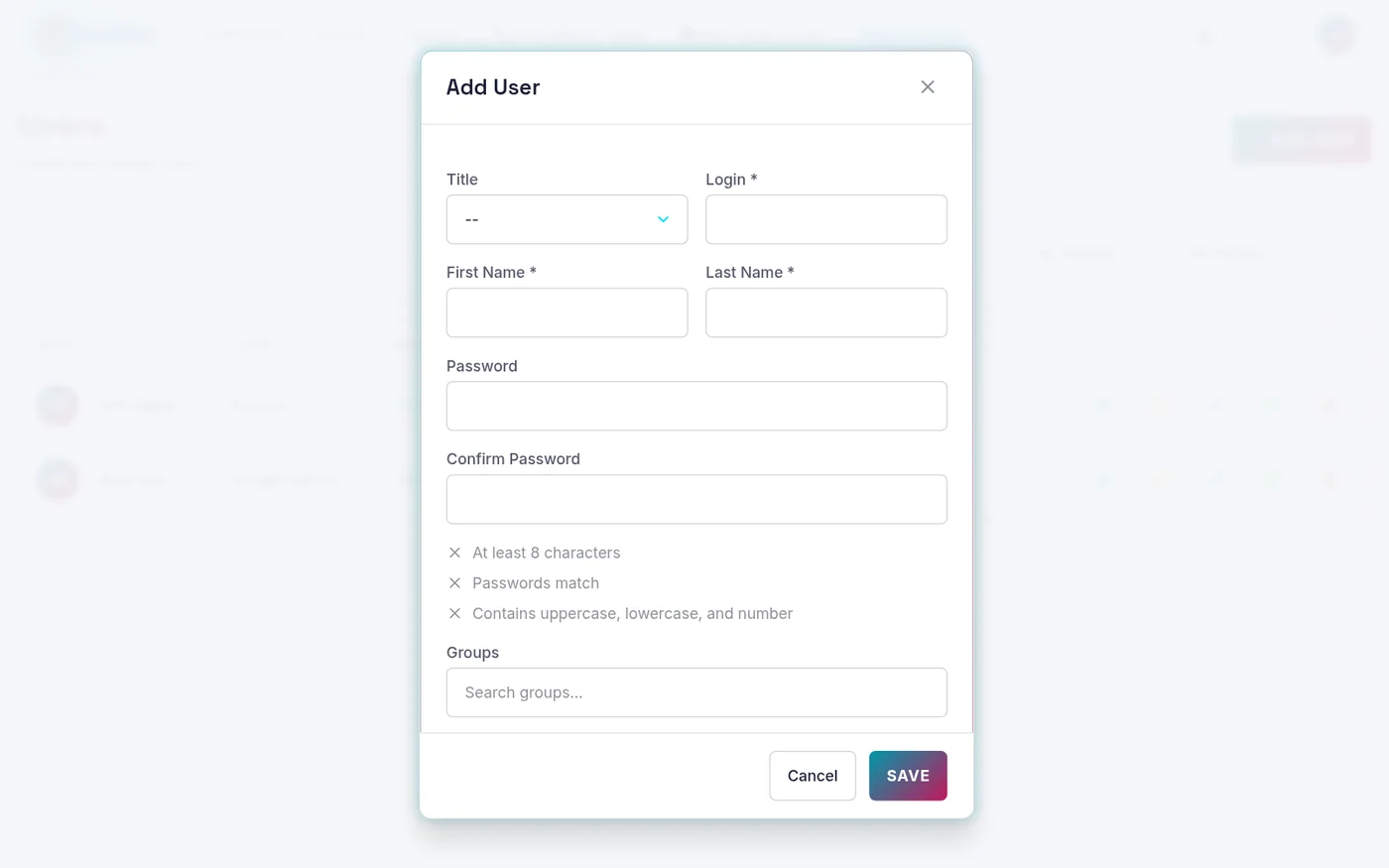
This is a reusable control, not a page hack. The data-multiple mode and its setMultiple/clearMultiple API live in the shared goatkit-autocomplete.js, so any admin form can opt in with plain template attributes.
Along the way we fixed the underlying data-model oddity that made the old checkbox list so noisy: group-membership queries used to join group_user without DISTINCT, so a user holding several permission rows for one group surfaced that group once per permission row. The admin user, group, and agent queue queries now SELECT DISTINCT the entity, so a group shows up exactly once no matter how many permission keys a membership carries.
Password policy + confirmation. Setting a new password in the add/edit-user modal now shows the live password policy (length, character classes, and confirmation match) and requires a confirmation field before submit. Previously that discipline only existed in the separate reset-password modal; now the two share one validation engine, so entering “password123” into the edit box gets caught the same way it would be on a reset.
RBAC-Scoped Dashboard Widgets
Dashboard widgets now know who is looking at them.
The core recent-tickets and queue-status widgets — and the stats plugin’s by-status / chart / SLA / time-tracking widgets — accept the acting user and scope their rows to the groups that user belongs to. An agent sees the queues their groups own; an admin still sees everything. The queue system-address deep link in the Queue Overview is admin-only now too.
This is part of a wider thread where plugin UI page handlers finally receive caller identity. pluginui.buildUIHandler forwards _user_id, _user_login, _user_email, _is_admin, _user_role, and _org_id from the request context, so a plugin rendering a UI page can resolve which user is looking at it, not just that someone is. Previously a UI page handler could only guess.
Delivery Details
A couple of smaller details worth knowing.
GoatFlow icon refresh. The GoatFlow icon got a refresh so it works better in both light and dark modes — the previous artwork relied on a single foreground colour that washed out against the dark theme. The updated mark reads cleanly on either background.
Duplicate group chips. Selecting groups in the user modal no longer renders the same group several times when it happens to be under multiple permission keys (the same DISTINCT story on the client side, as defense in depth).
The Security Sweep
Release tags in this project get a deliberate vulnerability pass before they go out, and 0.9.0 found real work to do.
govulncheck reported nine reachable advisories. All of them are cleared:
| Dependency | From | To |
|---|---|---|
| Go toolchain | 1.25.10 | 1.25.12 (stdlib: tls, x509, mime, textproto) |
google.golang.org/grpc | v1.79.3 | v1.82.1 |
github.com/yuin/goldmark | v1.7.4 | v1.7.17 |
github.com/cloudflare/circl | v1.3.3 | v1.6.3 |
github.com/russellhaering/goxmldsig | v1.4.0 | v1.6.0 |
The Go image and build references bumped 1.25.10 → 1.25.12 across every Dockerfile, the Makefile, CI, and helper scripts, so the stdlib fixes actually ship in the binary rather than living only in go.mod.
Beyond the fresh go dependencies, the earlier release pass already landed x/crypto → v0.54.0, x/net → v0.57.0, x/image → v0.44.0, plus quic-go and ntlmssp. After everything, govulncheck reports zero reachable vulnerabilities.
By the Numbers
- 3 Setup Assistant additions: response templates, business hours calendar, outbound email transport, all skippable
- 5 steps in the one-shot customer onboarding flow
- 9 reachable Go advisories fixed before the tag went out
- 75 the old group checkbox count a busy
admin/usersscreen could reach — now a searchable multi-select - 15 languages covering the new Setup Assistant strings
- 1 SAML2 flow, with user-supplied signing cert/private key required
- 4 group-membership queries deduped with
SELECT DISTINCT - Go 1.25.12,
grpc v1.82.1,goldmark v1.7.17,circl v1.6.3,goxmldsig v1.6.0 - 0 reachable dependency vulnerabilities after the sweep
What’s Next
0.9.1 does two things before any new headline feature. First, it finishes and fully exercises the Setup Assistant — end-to-end tests for every wizard step, review mode, and the onboarding API, so the technology preview can stop being a preview. Second, it turns back to the first-party open source plugin set that 0.8.3 pointed at (FAQ/Knowledge Base, Calendar & Appointments, Process Management), plus the shared test-DB isolation work that keeps the full suite flake-free even when every DB-backed test shares one database.
1.0.0 (hopefully in November 2026) remains the production cut: security audit, comprehensive load testing, documentation, and migration tooling.
Bonus Track: The OTP That Wouldn’t Leave Firefox
Every release has one bug worth retelling. 0.9.0’s is a six-character OTP loop that only happened in Firefox, and it was nobody’s crypto.
The agent 2FA login form auto-submits the moment you finish typing a six-digit code — no button press needed. It did that by dispatching a synthetic submit event on the form:
document.getElementById('2fa-form').dispatchEvent(new Event('submit'));
Here is the trap: new Event('submit') is not cancelable. The form’s handler called preventDefault(), but on an event that cannot be canceled, that call is a polite no-op. In Chrome it did not matter. In Firefox it did — Firefox treated the un-cancelable synthetic submit as a real form submission, reloaded the page, and the user was stuck re-entering their code forever.
Working in Chrome made it feel like a no-code, no-focus, maybe-someday issue. It was not. The fix was to stop synthesizing an event at all and call the verify function directly from both the submit handler and the 6-digit auto-submit:
twoFAForm.addEventListener('submit', (e) => { e.preventDefault(); verifyCode(); });
// ...and the auto-submit simply calls verifyCode()
Same lesson as 0.8.3’s two-container TOTP bug, wearing different clothes: the logic was not wrong, the transport of state was. Here it was a browser behavior difference over which submit is a submit. The fix is not more clever rendering; it is fewer moving parts — one function, two callers, zero synthetic events.
- Source & containers: GoatFlow on GitHub
- Full changelog: CHANGELOG.md
- Helm chart:
oci://ghcr.io/goatkit/charts/goatflow
Questions? Feedback? Open a GitHub Discussion and let us know what you think!